
Played Jigsaw puzzles?? Liked the challenge of compiling together pieces and creating a image out of it. Lets turn it back now and create a jigsaw puzzle out of an image.
To know how, read the tutorial at this link. Meanwhile, enjoy the puzzle pics...
Showing posts with label draw. Show all posts
Showing posts with label draw. Show all posts
Sunday, May 10, 2009
Puzzle Effect Photos


Tuesday, April 14, 2009
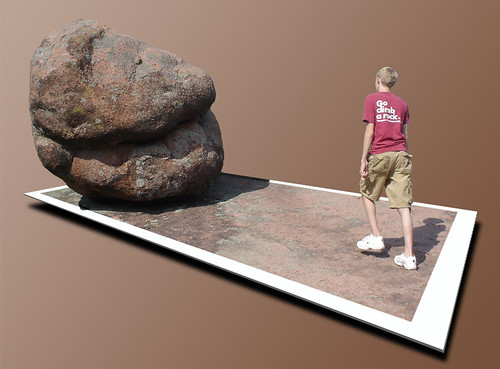
Out of Bound photos
An Out of Bounds photo referred to as OOB photo is a photograph which makes use of the image borders to add to the 3D feel of the image. To find out how much fun these are read ( I mean, see) the full post...
Read full post...



Saturday, April 11, 2009
Facebook Emoticons & Smileys
A quick view and keyboard shortcuts for smileys to put in your facebook interactions. Here you go...
Happy emote: :) or :-)
Really happy emote: :D or :-D
Wink emote: ;) or ;-)
Happy eyes: ^_^
Laughing eyes: >:o
Cat smile: :3
Grumpy: >:-(
Sad: :( or :-(
Crying emote: :’(
Shocked emote: :o or :-o
Glasses emote: 8) or 8-)
Cool shades: 8-|
Rude: :p or :-p
Woot?!: O.o
Dork emote: -_-
Duhhh emote: :/ or :\
Devil emote: 3:)
Angel emote: O:)
Kiss emote: :-* or :*
Love emote: <3
Pacman: :v
Robot: :|]
Weird guy’s face: :putnam:
Read full post...


Sunday, July 6, 2008
What's an emoticon exactly
New age internet lingo has often popped us new words which we don't find in traditional dictionary. One of these new age words is emoticon. But what's an emoticon exactly.
8-)
:-D
An emoticon is a version of shorthand developed by Internet users to help express emotions and thoughts without typing out the words. One dictionary definition of emoticons says that they . . . "are a very clever use of standard punctuation marks to express a human emotion."
When we communicate face to face, non-verbal communication, such as body language, facial expressions and tone of voice plays a crucial part in how someone interprets what we say. Emoticons allow us to personalize and put non-verbal communication into our written messages, to create e-mail moods. The key to communication is language; the emotion allows people to express feelings quickly and effectively through written word.
Origin of Emoticons
The origin of the original emoticon, the basic smiley face :-), is a matter of some dispute. Kevin Mackenzie is often credited with creating the first emoticon as the "tongue in cheek" symbol in 1979.
Others point to Scott Fahlman, who created the first digital smiley face and the first virtual frown in 1982. These were the first smiley faces that were not simply made of keyboard characters. In the 1980s, Howard Ball created a different form of the digital smiley face, the yellow upright smiley face that can now be downloaded off the Internet. Howard Ball is a graphic artist who created the first smiley as part of a morale boosting campaign.
Varied Emoticons
There are basic emoticons and smileys used in email messages to express emotions. Many people use Emoticons, they are a very popular form of shorthand for portraying emotions within email or instant messaging. There are thousands of emoticons located on the Internet and more are being created everyday. Here are a few of the more commonly used emoticons:
:-)
The classic smiley face (happy, grin)
:-l
Indifferent
:)
The simpler variation
:-e
Disappointed
:-(
The frown (unhappy)
>:-< Mad or angry
:-o Surprise or shock
:-D Laughing or very happy
:-@ Screaming or shouting
;-) Smile with a wink (joking, kidding, or sarcasm
How to Create and Understand Emoticons
Emoticons are made through the use of different combinations of numbers, letters and punctuation symbols that are found on a standard computer keyboard. There are hundreds and even thousands of emoticons that have been created. Emoticons have been created to represent almost everything, for example:
*<:-) Santa Claus
:---) Pinocchio
8-) Wearing sunglasses
+<:-) The Pope
C=:-) Chef
*<):0) Clown
?:^[] Jim Carrey
5:-) Elvis
:-.) Cindy Crawford
%-) A Happy Drunk
Emoticons created by keyboard characters are not always obvious when viewed horizontally. To see the face instead of just a string of different symbols, you need to tilt your head to the left, so that the right side of the emoticon becomes the bottom. Newer software packages allow users to use small images instead of a string of keyboard characters.
Read full post...
Friday, June 13, 2008
Create Web 2.0 logos
I know you must have got bored of traditional fonts and in Web 2.0 age, you prefer to have those cool , slick logos reflecting smooth edges and crystal refelctions. Here's how...
Go to site : http://www.simwebsol.com/ImageTool/Default.aspx
Enter you text,
Select font color, type, size
You can also add reflection proximity
as a bonus override the logo with some other symbols
And finally, save it in PNG, GIF or JPEG format.
Net..net. you get something like this .. howzatt Read full post...
Sunday, June 8, 2008
Right paper and pencil for that perfect drawing
There is always a query in one's mind as to whats the best paper and best pencil when one starts foray into serious pro drawing. Although experts would say pick up and draw it up, don't care to even think about material; the fact is that it always adds up to enhance effect of your drawing if you are using right paper and pencil.
Here is a informative video which tells you how to pick paper and pencil for your drawings. Interesting video not just for pencil art lovers but also for serious painting enthusiasts.
More interesting learning videos can be found here
Read full post...
Tuesday, May 27, 2008
Pencil Art animation picks
Is animation all about 3D and wireframes now ? Not exactly. Pencil art animation still remains a form to relish and enjoy...
Just for a break, let's get the colors removed out; 3D replaced with 2D and wireframes with pencils..yes, I am talking of pencil art animation. It seems like a good break from the glitzy and ever realistic animation. Remind you of the simple and pure way of drawing and not so simple and pure way of animating.
Sharing with you some picks on this form of animation
how amusing it can be
how many messages it can convey
how easy it can be
And if this inspires you to doodle something, drawing day is just round the corner !! Its on 7th June.
Read full post...
Friday, May 23, 2008
Event: Drawing Day - June 7, 2008
So you know how to draw, you know how to sketch, you know to fill in some colors also?
Then , pick ur pencil, board, paper and get, set, go on 7th June....
So you know how to draw, you know how to sketch, you know to fill in some colors also?
Then , pick ur pencil, board, paper and get, set, go on 7th June....
Drawing Day is a worldwide drawing event encouraging everyone to drop everything and draw for the sake of art. The internet is an open canvas. Help us create 1 million drawings online this day and boost online art communities.
Read full post...
Tool: Create your smiley banner
Ever wanted to create your own smiley text...ever wanted to send a smiley message to some one in your friends, class, team, family with the smiley winking and saying something like "Eddi - you rock!". Ok then here it is on how you can do it...
Ever wanted to create your own smiley text...ever wanted to send a smiley message to some one in your friends, class, team, family with the smiley winking and saying something like "Eddi - you rock!". Ok then here it is on how you can do it...
Here's a very cool link to create your own smileys banners:
http://stratsdot.com/smileysigngen/index.php
I created this smiley board by this site itself !! Enjoy !
Read full post...

Sunday, May 18, 2008
Tool : Create your own comic strip
One of my hobbies has been to create comic characters and then sometimes rope them into a comic strip. I started off by copying characters from comic strips, sketching them in my drawing book and then putting in colors in there. The tough part used to be making a tickling comic strip. So if I used to draw something, then put in some text and then used to think "hmm.. nope...you can do better" or "hey.. its just not gud enuf". And I used to...
One of my hobbies has been to create comic characters and then sometimes rope them into a comic strip. I started off by copying characters from comic strips, sketching them in my drawing book and then putting in colors in there. The tough part used to be making a tickling comic strip. So if I used to draw something, then put in some text and then used to think "hmm.. nope...you can do better" or "hey.. its just not gud enuf". And i used to end up drawing again and again.
So, here is the technology aided comic strip creator and yes, you don't need to download a software. All you need to do is just get online -> select characters --> select background etc --> put in text --> and sequence up frames.
Alright, now that I have tempted you enough...
So, here's how if you always wanted to create comic strips on the fly ?!!!
Here's your chance...
Two cool picks to create your own comic storyboards:
http://www.quicktoons.com/create
Up factor.... nice and easy
Down factor .... does not let you edit strip once created
The comic strip that is posted in my first blog is in fact created by first link here - quicktoons..
http://stripgenerator.com/create/
Up factor .... nice collections of humans, things etc.
Down factor .... we need colorful backgrounds !!!!
If you like the link, drop a comment down here.
So wishing you happy cartooning , doodling and coloring - all with mouse clicks !!!
Read full post...
Subscribe to:
Posts (Atom)

